If you want to add funds to your account and do not know how, this complete guide on 9J deposit will help you. We explain everything in simple and easy language so every user can understand how to complete the 9J game deposit process without any confusion.
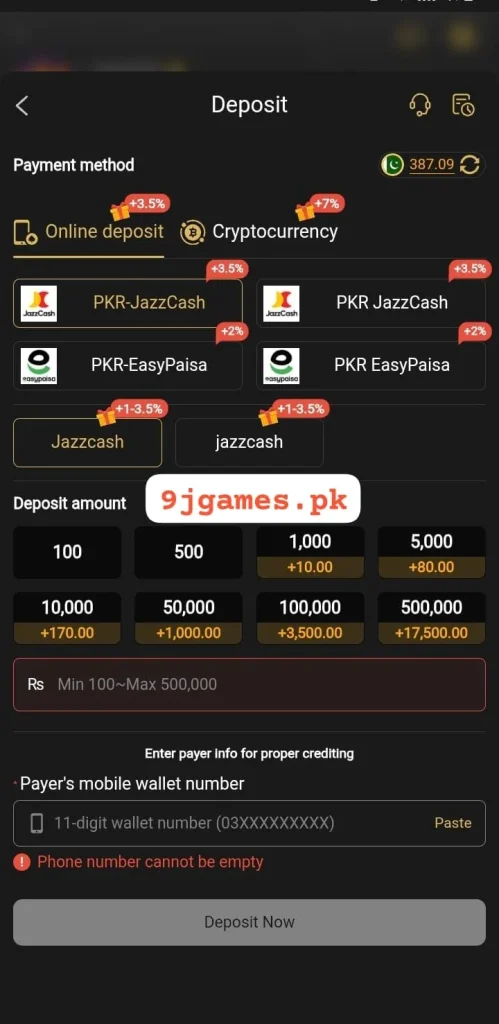
What is 9J Deposit?
9J deposit is the process of adding real money to your 9J account so you can play games and place bets. Without completing the 9 J deposit process, you cannot use the full features of the platform. It is a simple and quick process that takes only a few minutes.
9J Deposit Minimum and Maximum Amount
Before you start the 9J game deposit process, you must know the deposit limits:
| Deposit Type | Minimum Amount | Maximum Amount |
|---|---|---|
| Easypaisa | Rs. 100 | Rs. 10,000 |
| JazzCash | Rs. 100 | Rs. 10,000 |
| Cryptocurrency | Rs. 100 | Rs. 10,000 |
- Minimum Deposit Amount – Rs. 100
- Maximum Deposit Amount – Rs. 10,000
Always make sure your deposit amount is within these limits to avoid any issues.
9J Deposit Methods
9J offers three easy and convenient deposit methods for Pakistani users:
1. Easypaisa
Easypaisa is one of the most popular mobile payment methods in Pakistan. You can use your Easypaisa account or Easypaisa mobile wallet to complete your 9J deposit quickly and safely.
2. JazzCash
JazzCash is another widely used mobile payment method in Pakistan. You can use your JazzCash account or JazzCash mobile wallet to add funds to your 9J account easily.
3. Cryptocurrency
9J also accepts cryptocurrency deposits for users who prefer digital currency payments. This option is fast, secure, and available for users who have a crypto wallet.
How to Do 9J Deposit via Easypaisa – Step by Step

Follow these simple steps to complete your 9 J deposit using Easypaisa:
Step 1 – Login to Your Account
Go to 9Jgames.pk and complete your 9J login to access your account.
Step 2 – Go to Deposit Section
After login, go to your account dashboard and click on the Deposit button.
Step 3 – Select Easypaisa
From the deposit options, select Easypaisa as your payment method.
Step 4 – Enter Deposit Amount
Enter the amount you want to deposit. Remember the minimum is Rs. 100 and maximum is Rs. 10,000.
Step 5 – Enter Your Easypaisa Details
Enter your registered Easypaisa mobile number and other required details.
Step 6 – Confirm the Payment
Confirm your payment. You will receive a confirmation message on your Easypaisa app or phone number.
Step 7 – Deposit Complete
Your 9J game deposit is complete. Your account balance will be updated within a few minutes.
How to Do 9J Deposit via JazzCash – Step by Step
Step 1 – Login to Your Account
Go to 9jgames.pk and login to your account.
Step 2 – Go to Deposit Section
Click on the Deposit button from your account dashboard.
Step 3 – Select JazzCash
From the deposit options, select JazzCash as your payment method.
Step 4 – Enter Deposit Amount
Enter the amount between Rs. 100 and Rs. 10,000.
Step 5 – Enter Your JazzCash Details
Enter your registered JazzCash mobile number and required details.
Step 6 – Confirm the Payment
Confirm your payment through your JazzCash app or phone.
Step 7 – Deposit Complete
Your balance will be updated in your 9J account within minutes.
How to Do 9J Deposit via Cryptocurrency – Step by Step
Step 1 – Login to Your Account
Go to 9jgames.pk and login to your account.
Step 2 – Go to Deposit Section
Click on the Deposit button from your account dashboard.
Step 3 – Select Cryptocurrency
From the deposit options, select Cryptocurrency as your payment method.
Step 4 – Choose Your Crypto Type
Select the type of cryptocurrency you want to use such as Bitcoin, USDT, or others available on the platform.
Step 5 – Copy the Deposit Wallet Address
9J will provide you a crypto wallet address. Copy this address carefully.
Step 6 – Send Crypto from Your Wallet
Open your personal crypto wallet and send the amount to the 9J wallet address. Make sure the minimum amount is met.
Step 7 – Wait for Confirmation
Cryptocurrency transactions may take a few minutes to confirm depending on the network. Once confirmed your balance will be updated.
Step 8 – Deposit Complete
Your 9 J deposit via cryptocurrency is complete and your account is ready to use.
9J Deposit on Mobile
You can also complete your 9J game deposit easily on mobile:
- Open your mobile browser
- Go to 9jgames.pk
- Login to your account
- Tap the Deposit button
- Select your preferred payment method
- Enter the amount and details
- Confirm the payment
- Your deposit is done
The website works perfectly on all mobile phones and tablets.
Common 9J Deposit Problems and Solutions
Deposit Not Reflecting in Account?
- Wait a few minutes as it may take time to process
- Check your payment app to confirm the transaction was successful
- Contact 9J customer support with your transaction details
Wrong Amount Entered?
- Make sure the amount is between Rs. 100 and Rs. 10,000
- Do not enter an amount below or above the limit
Payment Failed?
- Check your Easypaisa or JazzCash balance
- Make sure your internet connection is stable
- Try again after a few minutes
Crypto Transaction Delayed?
- Cryptocurrency transactions depend on network speed
- Wait for network confirmation
- Contact support if it takes more than 30 minutes
Tips for Safe 9J Deposit
- Always login from the official website 9jgames.pk
- Never share your payment details with anyone
- Always double check the deposit amount before confirming
- Make sure you have enough balance in your Easypaisa or JazzCash account
- For crypto deposits always copy the wallet address carefully
- Keep a screenshot of your transaction as proof
Frequently Asked Questions
Conclusion
The 9J deposit process is very simple and easy. 9J offers three convenient payment methods which are Easypaisa, JazzCash, and Cryptocurrency. The minimum deposit amount is Rs. 100 and the maximum is Rs. 10,000. Just login to your account, go to the deposit section, choose your payment method, enter the amount, and confirm. If you face any problem during your 9J game deposit, follow the solutions in this guide or contact 9J customer support for help. Always keep your transaction details safe and enjoy your experience on 9J.